



































Watermelon
- Developer
- watermelon
- Released
- 19 Jun 2026
- Platform
- Browser
About Watermelon
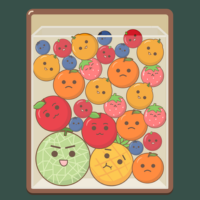
Watermelon (often inspired by the popular Suika Game style) is a casual, physics-based puzzle game where your main goal is to merge matching fruits to create larger ones, ultimately aiming to craft the ultimate fruit: a giant watermelon!
Game Controls
The controls are simple, intuitive, and designed for quick, casual sessions. Depending on your device, you can use either a mouse/keyboard or a touchscreen:
-
Move Fruit Left/Right:
-
Desktop: Move your Mouse cursor left and right across the container, or use the Left and Right Arrow Keys / A and D Keys on your keyboard.
-
Mobile/Touchscreen: Drag your finger left or right across the screen.
-
-
Drop the Fruit:
-
Desktop: Left-click your mouse, or press the Spacebar / Down Arrow Key.
-
Mobile/Touchscreen: Lift your finger off the screen to let the fruit drop.
-
How to Play & Gameplay Loop
1. Aim and Drop
A fruit will appear at the top of the container. Use your controls to position it precisely over the box and drop it.
2. Merge and Evolve
When two fruits of the exact same type touch each other, they will automatically fuse into a single, larger fruit. The evolution chain typically starts small (like cherries or strawberries) and builds up step-by-step into grapes, oranges, apples, melons, and finally, a Watermelon.
3. Manage the Space
As fruits evolve, they take up significantly more space. Because the fruits have physics, they will roll, bounce, and settle dynamically. You have to anticipate how they will move when they land!
4. Avoid the Game Over Line
There is a warning line at the very top of the screen. If your fruits stack up too high and cross this line for more than a few seconds, it’s Game Over.
???? Quick Tip for Success
Try to keep your largest fruits at the bottom of the container. If a massive melon sits on top of tiny cherries, it blocks them from merging, quickly filling up your screen and leading to a fast Game Over!